Back to the Office: Facilities Managers’ Guide to a Safe and Efficient Transition

Back to the Office: Facilities Managers’ Guide to a Safe and Efficient Transition

As companies worldwide enforce return-to-office mandates, facilities managers are at the forefront of ensuring a smooth and successful transition. Their role goes beyond simply reopening doors—it involves creating a safe, efficient, and welcoming environment that meets the evolving needs of employees. From optimizing office layouts to implementing new health protocols and technology-driven solutions, facilities managers must navigate a complex landscape to foster productivity and well-being. A well-planned approach can make all the difference in helping employees feel comfortable, engaged, and ready to embrace in-person work once again.

Assessing and Preparing Physical Spaces

The initial step in facilitating a smooth return involves a comprehensive assessment of existing office spaces. Facilities managers must evaluate whether current layouts align with health guidelines and organizational needs. This may involve reconfiguring workstations to ensure appropriate distancing, enhancing ventilation systems, and implementing touchless technologies to minimize contact points. Such modifications not only comply with health protocols but also reassure employees of their safety upon return.

Implementing Health and Safety Protocols

Health and safety remain paramount as employees transition back to the office. Facilities managers should establish rigorous cleaning schedules, particularly for high-touch areas, and ensure the availability of sanitation supplies throughout the workplace. Installing hand sanitizing stations, enforcing mask policies where necessary, and conducting regular health screenings can further mitigate risks. Clear signage and communication about these measures are essential to keep employees informed and engaged in maintaining a safe environment.

Leveraging Technology for Space Management

The adoption of technology plays a crucial role in modern facilities management. Implementing desk booking systems allows employees to reserve workspaces in advance, facilitating efficient use of space and adherence to occupancy limits. Utilizing sensors and analytics can provide real-time data on space utilization, enabling managers to make informed decisions about workspace configurations and resource allocation. These tools not only enhance operational efficiency but also contribute to a flexible and responsive workplace.

Supporting Hybrid Work Models

Recognizing that many organizations are adopting hybrid work models, facilities managers must accommodate both in-office and remote employees. This includes creating collaborative spaces equipped with advanced communication tools to support seamless interaction between on-site and off-site team members. Flexible workspace designs, such as hot-desking and shared meeting areas, can adapt to fluctuating attendance and foster a dynamic work environment.

Enhancing Communication and Employee Engagement

Transparent and consistent communication is vital during this transition. Facilities managers should provide regular updates on office policies, health protocols, and any changes to the work environment. Engaging employees through surveys and feedback mechanisms can offer insights into their concerns and preferences, allowing for adjustments that enhance comfort and productivity. Empowering employees with information and involving them in the transition process fosters a sense of community and shared responsibility.

Training and Development for Facilities Teams

The evolving workplace landscape necessitates that facilities teams are well-versed in new technologies and protocols. Providing training on the latest facilities management software, health and safety regulations, and emergency response procedures ensures that the team is prepared to handle the complexities of the modern work environment. Continuous professional development not only enhances team performance but also contributes to the overall resilience of the organization.

Collaborating with External Partners

Facilities managers often collaborate with external vendors and service providers to maintain and enhance workplace operations. Establishing clear expectations and communication channels with these partners is essential to ensure that services such as cleaning, maintenance, and security align with the organization's standards and schedules. Regular reviews and feedback sessions can help maintain high service quality and address any issues promptly.

Monitoring and Adapting to Ongoing Changes

The return-to-office process is dynamic, with potential changes in health guidelines, employee sentiments, and organizational objectives. Facilities managers must remain agile, regularly monitoring the effectiveness of implemented measures and being prepared to adapt as necessary. Staying informed about industry best practices and emerging technologies can provide valuable insights for continuous improvement.

In conclusion, the role of facilities managers is pivotal in orchestrating a successful return to the office. By focusing on health and safety, leveraging technology, supporting hybrid work models, and maintaining open communication, they can create a work environment that is safe, efficient, and conducive to employee well-being. Proactive planning and adaptability will not only facilitate a smooth transition but also position the organization for future resilience in an ever-evolving workplace landscape.

How Archibus Can Help

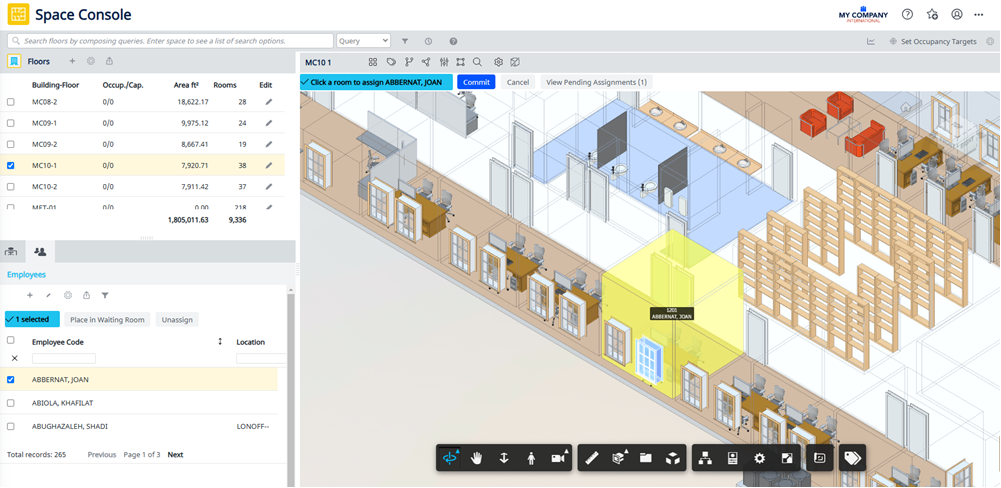
Archibus, a leading integrated workplace management system (IWMS), can be a game-changer for facilities managers navigating the return-to-office transition. Its powerful suite of tools enables real-time space planning, occupancy tracking, and maintenance management, ensuring workspaces are used efficiently and safely. With features like reservation systems for desks and meeting rooms, air quality monitoring, and automated workflow processes, Archibus helps streamline operations while maintaining compliance with health and safety protocols. By leveraging data-driven insights, facilities managers can make informed decisions that enhance workplace flexibility, improve resource allocation, and create a more adaptive and responsive office environment.

Enhancing Design Coordination in AEC Projects with BIM Collaborate Pro

Enhancing Design Coordination in AEC Projects with BIM Collaborate Pro

In the world of Architecture, Engineering, and Construction (AEC), the importance of seamless coordination across various design functions and disciplines cannot be overstated. Properly aligned workflows can transform project outcomes, significantly improving efficiency and minimizing the need for multiple design iterations. With advanced tools like BIM Collaborate Pro, an Autodesk Construction Cloud (ACC) product, design coordination has entered a new era, enabling projects to be managed with greater precision, security, and traceability. The following video explores how BIM Collaborate Pro facilitates this coordination process, ensuring that every discipline can collaborate seamlessly while enhancing project quality. Watch it now to see how advanced design coordination can transform AEC project workflows.

The Impact of Defined Review Processes

A well-structured review process through design coordination is key to achieving large efficiency gains. Establishing this process at both the company and project levels is critical for effective collaboration, ensuring that every discipline adheres to project standards and procedures from the beginning. This approach enables various teams, each contributing their specialized expertise, to work cohesively within a shared framework. As a result, it reduces rework and streamlines the journey toward the final design.

Project-Level Coordination: Efficient Sharing and Collaboration

Large-scale construction projects often involve multiple companies, each contributing specialized data for their respective design disciplines. Effective project-level coordination facilitates this collaboration by enabling secure data sharing among these companies. This involves creating a robust environment where each discipline can exchange information with stakeholders while also managing their internal data-sharing needs.

Using BIM Collaborate Pro, companies can create a shared coordination space specifically for this purpose. The shared coordination space acts as a controlled environment where design data can be securely shared and managed, enhancing both security and traceability. Additionally, the platform’s clash detection features enable teams to identify and resolve potential issues early on, ensuring a smoother path to project completion.

Edit Coordination Space Folders screenshot
Setting up coordination space folders in Autodesk Construction Cloud

Company-Level Coordination: Leveraging Internal Collaboration

Within each company, design disciplines need a collaborative framework to refine their designs and optimize quality before sharing with other project stakeholders. BIM Collaborate Pro allows companies to set up dedicated coordination spaces, where teams can run internal clash checks and coordinate data among internal disciplines, such as architectural, structural, and MEP. By using live connections for data sharing, these internal teams can ensure that each design aspect aligns well before it is integrated at the project level.

Managing Coordination Spaces screenshot
Managing coordination spaces in Autodesk Construction Cloud

The Role of Project Templates and Permissions

Setting up a project within ACC often starts with the use of project templates. These templates store critical project parameters, standards, and member permissions, allowing for consistent setup across projects. By defining permissions at a folder level, project administrators can control access based on team roles, ensuring that collaborators only interact with the data they need. This security-first approach is crucial for maintaining control over sensitive project information.

Creating a project template in Autodesk Construction Cloud

“The refined standard project management folder structure and templates intuitively caused project participants to explore the use of all available modules, reducing management by email and spreadsheets.”

– Ann Blanchard, Senior Project Manager, Arcadis

Flexibility and Adaptability in Coordination Spaces

Every construction project evolves, and the BIM Collaborate Pro coordination spaces are designed to adapt to these changes. For example, new coordination spaces can be added, and existing ones can be adjusted by modifying content folders, enabling clash detection, or even renaming the spaces as project needs shift. This flexibility ensures that the coordination setup remains relevant and useful throughout the project lifecycle.

Enhancing Interdisciplinary Collaboration with Defined Workflows

Design collaboration workflows within the Autodesk Construction Cloud streamline data sharing across companies. Here’s how it works. Once a design team—say the structural team—creates a data package, it is shared along a project timeline. The MEP team, working within the same environment, can then explore this structural data. If they find it necessary for their designs, they “consume” the data, bringing it into their own data structures to inform their design decisions. This shared workflow not only enhances coordination, but also maintains a record of interactions, ensuring traceable and reliable data exchanges.

Issue Tracking and Resolution with BIM Collaborate Pro

Effective issue management is vital in collaborative projects. When clashes or concerns arise, they can be tracked and resolved within Autodesk Construction Cloud. For example, if a clash is detected between structural and MEP data, an issue is raised and assigned to the relevant team, with responsible members and response timelines prepopulated via templates. This structured approach enables team members to address issues promptly, redesign as needed, and re-share updated models, keeping all stakeholders informed throughout the resolution process.

Issues management screenshot
Manage issues in Autodesk Construction Cloud

Driving Efficiency with Advanced Coordination Tools

BIM Collaborate Pro, paired with the AEC Collection, empowers design and construction teams to elevate operational efficiency through advanced workflows. By enabling coordinated, flexible, and secure project environments, these tools help teams work more effectively, reduce rework, and ultimately deliver better project outcomes.

Incorporating design coordination with BIM Collaborate Pro into your projects can streamline your team’s workflows, minimize costly errors, and enable more efficient project delivery. With coordination at both company and project levels, teams are set up for success from day one.

The Best Way to Get BIM Collaborate Pro

If you’re new to Autodesk or want to get this software today, our team at Robotech can help. We offer comprehensive entry-level basics training, and we sell Autodesk software directly to companies across the country. We are a gold partner of Autodesk, and we’ll ensure your team is fully set up and comfortable with the software before we consider the job “done”.
We have a few Autodesk packages that we offer, and we can provide a free trial for you to test it before you buy. Within a few minutes, you’ll see how helpful this software is in maintaining your healthcare compliance accreditation.

Schedule a call to get started today.

Leveraging Asset Management Software in 2025

Leveraging Asset Management Software in 2025

Revolutionizing Asset Management for 2025 and Beyond

As organizations continue to evolve in an increasingly digital landscape, the role of asset management has never been more crucial. By 2025, advanced asset management systems are set to redefine operational efficiency, enabling businesses to connect disparate systems, streamline decision-making, and optimize resources. These systems provide comprehensive asset lifecycle management while enhancing connectivity across various applications.

Enhancing Connectivity Between Space and Operations

A major advantage of modern asset management software is its ability to seamlessly integrate space and operational applications. This connectivity ensures that asset location, utilization, and maintenance data are consistently linked with operational workflows. For instance, facility managers can conduct on-site asset surveys while instantly updating space utilization metrics. This integrated approach minimizes downtime, optimizes resource use, and ensures that every asset contributes to operational efficiency.

Practical Benefits of Advanced Asset Management

The benefits of adopting a robust asset management platform extend beyond traditional asset tracking. Key advantages include optimized asset utilization, reduced inventory levels, and proactive maintenance scheduling. These systems also simplify compliance with regulatory requirements by providing accurate audit trails and real-time transparency into asset status. Organizations can further reduce environmental impact by improving reuse and repurposing of existing assets.

  • Enhanced financial control through detailed lifecycle cost tracking.
  • Improved decision-making using real-time asset performance data.
  • Reduction of operational downtime with predictive maintenance.
  • Increased accountability via centralized asset tracking and reporting.
  • Better support for sustainability goals through efficient resource utilization.


Driving Operational Excellence Through Visualization and Reporting

With advanced asset management tools, asset management becomes a visually intuitive process. Tools such as dashboards and GIS mapping allow managers to locate assets geographically, analyze building performance, and evaluate energy consumption patterns. These insights enable better decision-making, from strategic investments to day-to-day operations like moves and reconfigurations. By connecting asset data with financial and operational metrics, organizations can maximize return on asset investment.

Improving Business Continuity with Integrated Lifecycle Management

Effective asset management enhances business continuity by ensuring that assets are managed proactively. Features like equipment failure analysis and warranty tracking help prevent unexpected downtime, while centralized lifecycle data enables timely replacement or repurposing decisions. This proactive approach safeguards worker productivity and ensures uninterrupted operations, making advanced asset management systems indispensable tools for infrastructure and facility managers.

Archibus: A Comprehensive Asset Management Solution

Archibus stands out as a powerful Integrated Workplace Management System (IWMS), offering unmatched capabilities to manage assets effectively. From tracking and maintaining equipment to repurposing resources, Archibus centralizes asset information, providing managers with a holistic view of their operational environment. Features such as GIS mapping, equipment warranties, and real-time lifecycle data make Archibus a cornerstone for modern asset management.

The Best Way to Get Archibus

If you’re new to Archibus or want to get this software today, our team at Robotech can help. We offer comprehensive entry-level basics training, and we sell Archibus software directly to companies across the country. We are a gold partner of Archibus, and we’ll ensure your team is fully set up and comfortable with the software before we consider the job “done”.
We have a few Archibus packages that we offer, and we can provide a free trial for you to test it before you buy. Within a few minutes, you’ll see how helpful this software is in maintaining your healthcare compliance accreditation.

Schedule a call to get started today.